Every job, from artwork to out the door
A board with your own stages, a calendar of what's due, tasks for each person, and courier tracking when it goes out.
Your board, your words
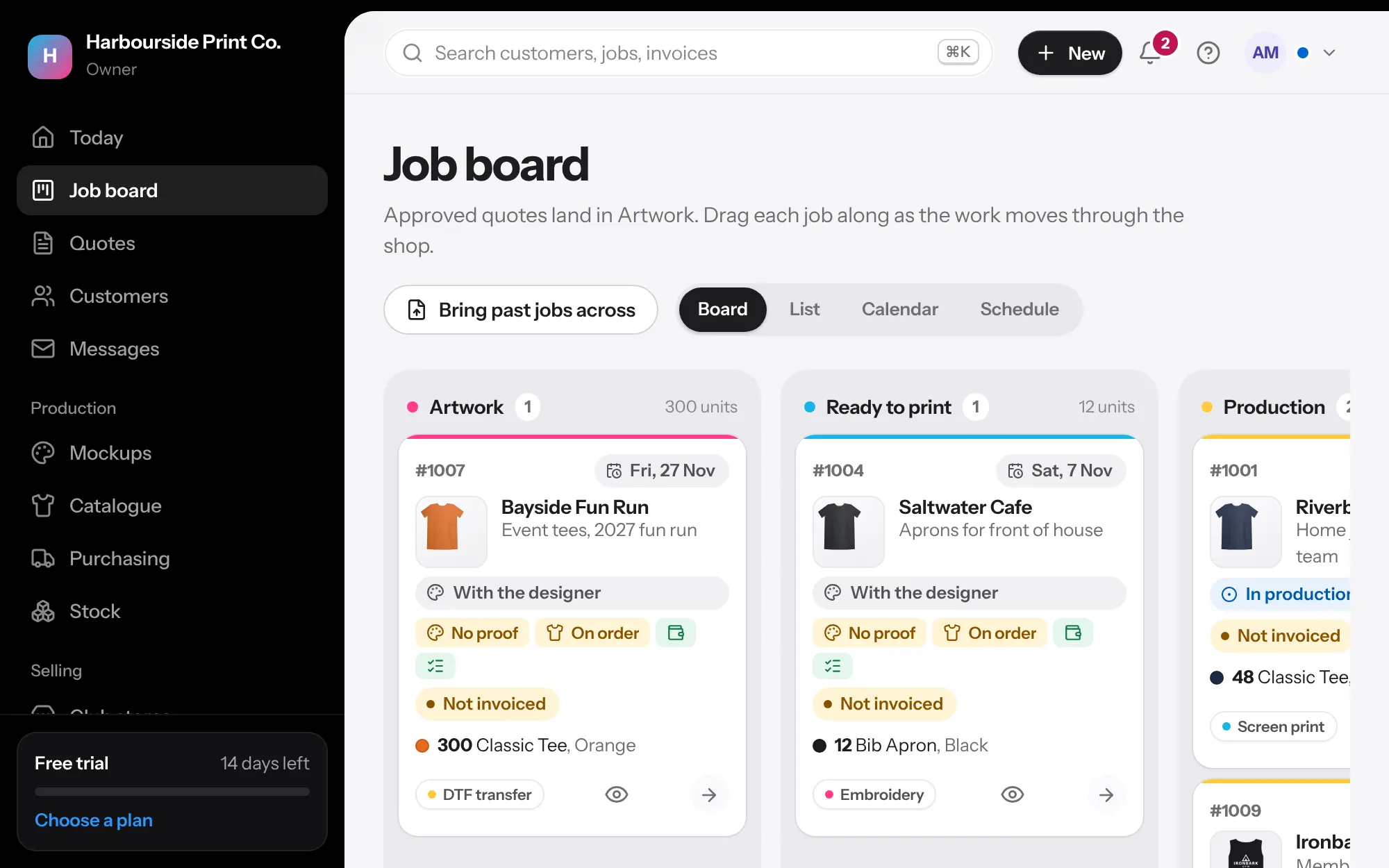
Rename the stages, hide the ones you don't use and add your own, like Curing or Quality check. Each card shows the artwork, garment colours and a ready-to-print check: artwork approved, blanks in, deposit paid and no tasks left. Drag cards, or move a whole list of jobs at once.
- Ready to print at a glance: artwork, blanks, payment and tasks
- Late jobs stand out
- A list view with filters and bulk changes
Who's on it, and where it's up to
Every job has a sales rep, designer and printer, with their faces on the card. Artwork, blanks, payment and shipping each show where they're up to, and keep themselves current from what's happened, so nobody has to click a status. Add your own fields for anything else, like the machine or print date.
- My jobs for each person, and Your jobs on Today
- Your own status, date, text and person fields, with your colours
- Filter and change several jobs at once by person
Plan the week
The calendar shows jobs on the day they're due and how many units that is. Drag a job to change its date. The schedule shows every job as a bar from approval to due date, so you can see what overlaps.
- Set how many garments you can do in a day, and busy days are flagged
Made for the shop floor
Every job sheet has a QR code. Scan it with any phone and move the job along in one tap, with no hunting through screens. The team talks on the job itself, and @mentions land on that person's Today.
- QR codes on job sheets, nothing to install
- Team comments on each job, with @mentions
- A timer on every job, from a phone or the desk, with labour at your hourly rate
Out the door
Print the job sheet and packing slip, email the customer when it's ready, and record the courier and tracking number. Customers see 'on its way' with a tracking button.
- Australia Post, StarTrack, Aramex, CouriersPlease, TNT, DHL and more
- With Shippit connected: compare prices, book, print the label and track
- An 'on its way' email and text, ready to send
- Names and numbers listed by size on the job sheet
Questions
Can production staff see prices?
No. Production logins are free and never show prices or costs. They see the job sheet, board and calendar.
Your next job, start to finish.
We're opening to shops a few at a time. Tell us about yours and we'll be in touch to get you set up.